AI & Automation · Vancouver
Intelligence doingreal work.
AI connected to your data, workflows and existing systems. Built to interpret, classify, recommend and act inside clearly defined business processes.
Specific jobsConnected systemsHuman control
Reference workflow
- New lead receivedCaptured
- Message interpretedRead
- Fit classifiedClassified
- CRM record synchronizedSynced
- Follow-up preparedPrepared
- Human review requestedAwaiting approval
- Outcome recordedRecorded
Runs locally in this page. No model call, no API, no data captured.
The problem
Most AI demosnever become operations.
Most are wrappers. Some are useful. The rest is noise.
A useful demonstration is not the same as a reliable business system. Operational AI needs a defined job, approved information, connected systems, clear permissions and a person responsible for the outcome.
01
A defined job
The system needs a specific responsibility.
02
Approved context
It needs reliable information and clear boundaries.
03
A connected action
The result has to reach the system where work happens.
04
Human ownership
Someone remains responsible for important decisions.
AI action map
Watch the agent work.
Select a business job and follow what the system reads, decides, updates and returns to the team.
01 / Trigger
New website enquiry
02 / Understand
Read the message, form data, source and business context
03 / Decide
Classify intent, service fit and urgency
04 / Act
Create or update the CRM record and route the opportunity
05 / Human control
The assigned person reviews high-value or uncertain leads
Outcome
Faster response with clearer prioritization
Reference workflow
09:41:02 Trigger received
09:41:03 Context loaded
09:41:04 Intent classified
09:41:05 CRM record synchronized
09:41:05 Human review requested
Synthetic reference states. No client records, no model call, no external request.
The capability
Four useful thingsAI can do inside a workflow.
01Interpret
Read what software normally cannot.
Turn unstructured information into context the system can use.
- Enquiries
- Emails
- Documents
- Transcripts
- Notes
- Descriptions
02Classify
Decide where information belongs.
Apply consistent classification while flagging uncertainty for review.
- Intent
- Urgency
- Fit
- Category
- Lifecycle stage
- Exception type
03Generate
Prepare useful work.
Generate from approved context rather than from an empty prompt.
- Summaries
- Drafts
- Structured records
- Follow-ups
- Reports
- Next steps
04Act
Move the workflow forward.
The value appears when intelligence reaches the system where the work happens.
- Update a record
- Route work
- Trigger a notification
- Request approval
- Log an outcome
Specific jobs
We build agentswith responsibilities.
Lead Qualification
- What enters
- Website enquiries and form data
- What AI does
- Classifies intent, fit and urgency, then routes the opportunity
- What changes
- The right person sees the right lead sooner
- Human control
- High-value and uncertain leads go to a person
Customer Follow-up
- What enters
- Pipeline stages and contact history
- What AI does
- Prepares the right message at the right moment
- What changes
- Follow-up stops depending on memory
- Human control
- Sensitive messages require approval before sending
Content Operations
- What enters
- Approved structured records
- What AI does
- Drafts content and flags what is missing
- What changes
- Content keeps pace with the catalogue
- Human control
- A person reviews before anything publishes
Internal Knowledge
- What enters
- Approved documents and procedures
- What AI does
- Retrieves and answers with source references
- What changes
- Institutional knowledge stops living in one head
- Human control
- The employee owns judgment and exceptions
Reporting & Analysis
- What enters
- Approved performance and workflow data
- What AI does
- Summarizes movement and surfaces exceptions
- What changes
- Reports arrive assembled instead of assembled manually
- Human control
- Management decides what action to take
Control model
Automate the work.Keep people in control.
Automatic
Low-risk, reversible and well-defined actions can happen without review.
- Categorize a request
- Extract fields
- Update a low-risk record
- Route a task
- Create an internal summary
Approval required
AI prepares the action. A person approves it before it affects a customer or important record.
- Customer follow-up
- Public content
- Inventory description
- Outbound message
- Important system update
Human decision
AI provides context and a recommendation. A person remains responsible for the decision.
- Pricing exception
- High-value opportunity
- Compliance-sensitive communication
- Strategic recommendation
- Unusual customer case
Operational AI / 01
Intelligence connectedto a real operating platform.
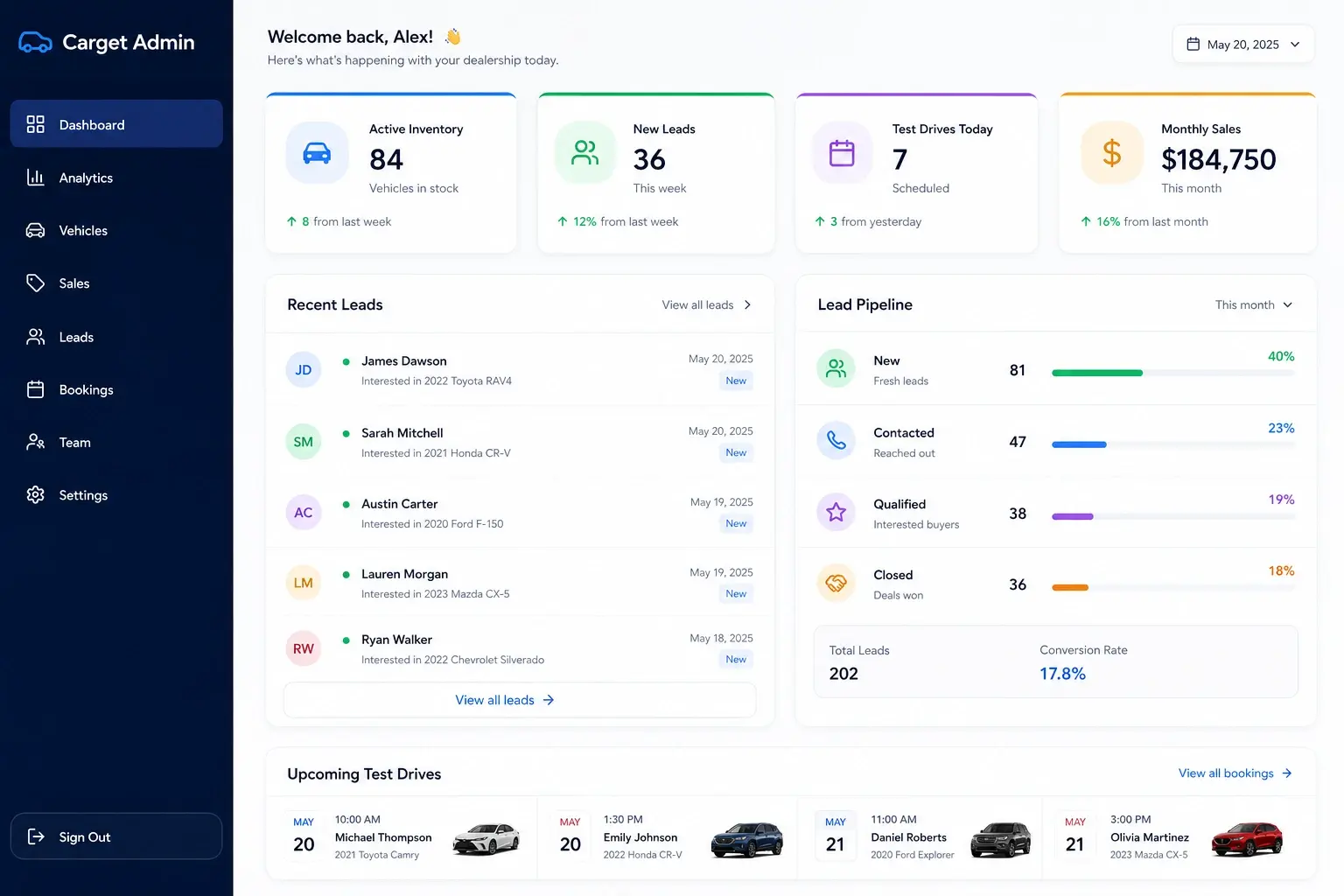
The dealership’s platform generates website content from structured inventory and runs the lead follow-up infrastructure. The AI layer works inside that system, against approved data and rules, with people reviewing content and customer communication before it moves.
Vehicle and inventory data
Approved business rules
AI content processingHuman review
Custom CMS and admin
Website
Lead
Follow-upHuman review
Sales workflow
Internal knowledge
Make approved knowledgeeasier to use.
Policies, guides, procedures, service information and project documentation often exist across folders, messages and people. An internal knowledge workflow can retrieve relevant approved sources and return an answer with references.
Source-grounded, permissioned and honest about its limits: when the source does not support an answer, the system should say so, and the question escalates to a person.
Question
Approved sources
Retrieval
Answer with references
Human use
Use the right tool
Not every workflowneeds AI.
Automation
Use when the rules are clear.
- If form submitted, create a record
- If booking cancelled, notify the team
- If status changes, send the template
- If payment succeeds, update the account
AI
Use when the system must interpret context.
- Understand what the enquiry is about
- Classify intent and urgency
- Summarize a document
- Generate a context-aware draft
- Recommend the next action
The best systems often use both: deterministic automation for certainty and AI where interpretation is required.
The foundation
Systems first.AI where it earns its place.
AI cannot repair unclear ownership, inconsistent data or a broken workflow. The operating system establishes records, permissions, rules and process. AI can then interpret and act inside that controlled environment.
System of record
Rules and permissions
AI layer
Controlled action
Control & trust
Every action needsa boundary.
- Approved access
- The system receives only the information and permissions required for its job.
- Role-based control
- Users, tools and actions follow defined access boundaries.
- Traceable actions
- Important events, updates and approvals can be recorded for review.
- Controlled failure
- Uncertain, high-risk or unsupported cases stop, escalate or request human input.
Reference control log
10:14:31 Context loaded
10:14:32 Source matched
10:14:33 Classification confidence below threshold
10:14:33 Human review requested
10:15:20 Action approved
10:15:21 Record updated
Synthetic reference states. No customers, no real data.
Technology choice
Use the best model for the job.Own the system around it.
Use existing models
Use established commercial model APIs when they solve the problem reliably and economically.
Integrate existing tools
Connect AI features already available inside the client's current systems when rebuilding them would add no value.
Build the operating layer
Create custom orchestration, context, permissions and actions when the workflow is specific to the business.
Model providers change. The durable asset is the workflow, the data architecture, the orchestration, the controls and the ownership around the model, and that asset is yours.
How we implement
Define the jobbefore choosing the model.
01
Identify
Select a specific high-value job and define the current process.
02
Bound
Establish inputs, approved context, permissions, failure states and human control.
03
Prototype
Test the workflow using representative scenarios and measurable acceptance criteria.
04
Connect
Integrate the agent with the systems where information and actions belong.
05
Operate
Monitor quality, cost, adoption and exceptions, then improve from real usage.
The agent is not ready because a demonstration worked once. It is ready when it performs defined scenarios within agreed boundaries.
Investment
Fixed scope afterworkflow definition.
The cost depends on the job, systems, data access, required controls, integration depth and ongoing model usage.
AI workflow pilot
$4,000 – $8,000
Fixed project
One bounded workflow with approved context, a clear trigger and a measurable responsibility: classification, summarization, controlled drafts, structured extraction or simple lead triage.
Controlled AI agent
$8,000 – $18,000
Fixed project
A production workflow where AI interprets context and updates connected systems inside defined human controls: orchestration, CRM integration, approvals, logs, evaluation and deployment.
Multi-system AI implementation
$18,000 – $40,000+
Fixed project · scoped after mapping
Complex implementations across multiple workflows, business systems, permissions and internal knowledge, with the scope defined by system mapping before the build is quoted.
Implementation is a fixed price, and you own the system. Ongoing costs stay visible and separate: expected model and third-party usage is estimated before implementation, billed at cost, and depends on volume and provider pricing. Optional support and monitoring are scoped separately, never bundled invisibly.
Where this works, and where it does not.
A good fit
- A specific repetitive or decision-support job is already identifiable.
- The business has data or source information the system can use.
- Existing systems can be connected.
- Someone inside the business owns the outcome.
- Human controls can be clearly defined.
- The potential operational value justifies implementation.
Probably not us
- The objective is “add AI” without a defined job.
- The business expects a fully autonomous replacement for its team.
- Source information is unavailable or unreliable.
- Nobody can approve, monitor or own the workflow.
- The goal is a generic chatbot because competitors have one.
- The project depends on guaranteed model accuracy.
Questions before implementation
Understand the responsibilitybefore deploying the agent.
What is an AI agent?
A system with one defined responsibility inside your business: qualify a lead, prepare a follow-up, draft content from approved records, answer internal questions, or assemble a report. Each agent has a defined input, a defined output, connected systems and a person responsible for the outcome. We build agents that do specific jobs, not chatbots that pretend to be humans.
How is an AI agent different from automation?
Automation follows explicit rules: if the form is submitted, create the record. AI interprets: what is this enquiry about, how urgent is it, what should happen next. The best systems use both, deterministic automation where rules are clear, and AI only where interpretation is genuinely required.
How is this different from a chatbot?
A generic chatbot answers whatever visitors type, with no responsibility and no connection to your operations. Our agents are bounded: they work against approved context, act inside your systems, and hand off to people. Where a website assistant genuinely fits, we build it as a bounded job with clear hand-off, not a pretend human.
What business processes can AI automate?
The recurring, definable ones: lead qualification, customer follow-up, content operations from structured records, internal knowledge retrieval, and reporting. If a job has clear inputs, a nameable outcome and someone who owns it, it is a candidate. If nobody can define the job, that is the first problem to fix, and AI is not the fix.
Can AI connect to our CRM or existing systems?
Usually, yes. Most established CRMs, calendars and platforms expose APIs, and reaching the system where work actually happens is the point. Where a tool has no usable interface, we say what is and is not possible before anything is scoped.
Does our data train a public model?
Commercial model APIs used under business terms do not train on your data by default under current provider policies, and we configure accounts accordingly. Provider terms are reviewed as part of implementation, and where the sensitivity justifies it, private or locally hosted models are an option. What we do not do is claim absolute guarantees on another company's infrastructure.
How do you handle sensitive information?
The system receives only the information its job requires. Access is permissioned, sensitive fields can be excluded or masked, important events can be logged, and data handling follows the client's own policies and the provider's business terms. Architecture is reviewed before anything connects.
Can a person approve actions before they happen?
Yes, and for anything customer-facing or important we insist on it. Every workflow is built on one of three modes: automatic for low-risk reversible actions, approval-required where AI prepares and a person confirms, and human-decision where AI only provides context and a recommendation.
What happens when the AI is uncertain?
It stops. Uncertain, high-risk or unsupported cases escalate to a person rather than guessing. Confidence thresholds and failure states are defined during implementation, and the reference log records that the escalation happened.
Can you use our internal documents?
Yes, through a source-grounded retrieval workflow: the system searches approved documents, answers with references, and says so when the sources do not support an answer. It never becomes an oracle. When the source is missing, the honest output is the gap.
Do we own the system?
Yes. Source code, infrastructure, prompts, workflows and admin access transfer to you, the same ownership position MOST takes on every service. The model API is a supplier you can change; the system around it is yours.
Which AI model do you use, and can it be changed later?
The best fit for the job at the time, under your account. The orchestration is provider-agnostic by design, because models improve and pricing changes. Swapping or upgrading the underlying model later is an expected maintenance event, not a rebuild.
How much does AI implementation cost?
Fixed scope, fixed price after workflow definition. Current published ranges: an AI workflow pilot runs $4,000 to $8,000; a controlled AI agent in production runs $8,000 to $18,000; multi-system implementations run $18,000 to $40,000 and up, all CAD. The full breakdown is on the pricing page.
What ongoing costs should we expect?
Third-party model usage, billed at cost - expected usage is estimated before implementation and depends on volume and provider pricing - plus hosting you likely already pay for. Optional support and monitoring are scoped separately. Implementation is a fixed price, but we will not call it a one-time cost while usage continues, because that would be misleading.
How long does implementation take?
A bounded pilot typically lands in weeks rather than months, including tuning after launch. Larger agent and multi-system work is phased, and the timeline is documented in the scope before work starts.
How do you test quality?
Against defined scenarios with measurable acceptance criteria, not a demo that worked once. The agent ships when it performs the agreed scenarios within agreed boundaries, and monitoring after launch watches quality, cost and exceptions in real usage.
Will AI replace my staff?
These systems take over repetitive reading, sorting, drafting and assembling, and hand people better-prepared work. Judgment, relationships and decisions stay human, and every workflow we build keeps a person in control of what matters. Businesses generally redeploy the recovered hours, not the people.
What happens after launch?
A tuning window is included in every tier, your team is trained, and the system is documented. After that, it runs on your accounts; optional monthly monitoring exists for businesses that want us watching quality and exceptions, and the workflow can gain new jobs over time.
Give the system a job
Put intelligencewhere the work happens.
Start with one defined process, one measurable responsibility and clear human control.
Vancouver, BC · Serving Metro Vancouver
Insights
Read the thinkingbehind this work.
AI Implementation
What an AI agent actually costs, and what it doesReal cost ranges, real examples, no buzzwords. What AI agents do in a working business, and how to know if one will earn its keep in yours.8 min readAI Explained
Not all AI is the same. Which model fits which job?ChatGPT is not one AI. Neither is Claude or Gemini. Every lab ships a family of models built for different tasks, and the price difference between them is up to 100x. Here is how the tiers actually work, what we run in production for clients, and the expensive mistakes to avoid.8 min readAI Explained
Why AI makes things up, and how to build systems that don'tDeloitte refunded an Australian government client after shipping a report with fabricated citations. A BC tribunal made Air Canada pay for a policy its chatbot invented. Neither was bad luck. Here is why hallucinations happen, why dumping raw data into a chatbot makes them worse, and how we engineer around them.10 min readBrowse the full library:The Field GuideBuyer GuidesAI by Industry
Start here
Map it before you build it.
We map the process first, then automate the part that actually pays for itself. Start with a free audit of where the time goes.
Prefer to talk? (250) 581-0523 or info@mostailabs.com